
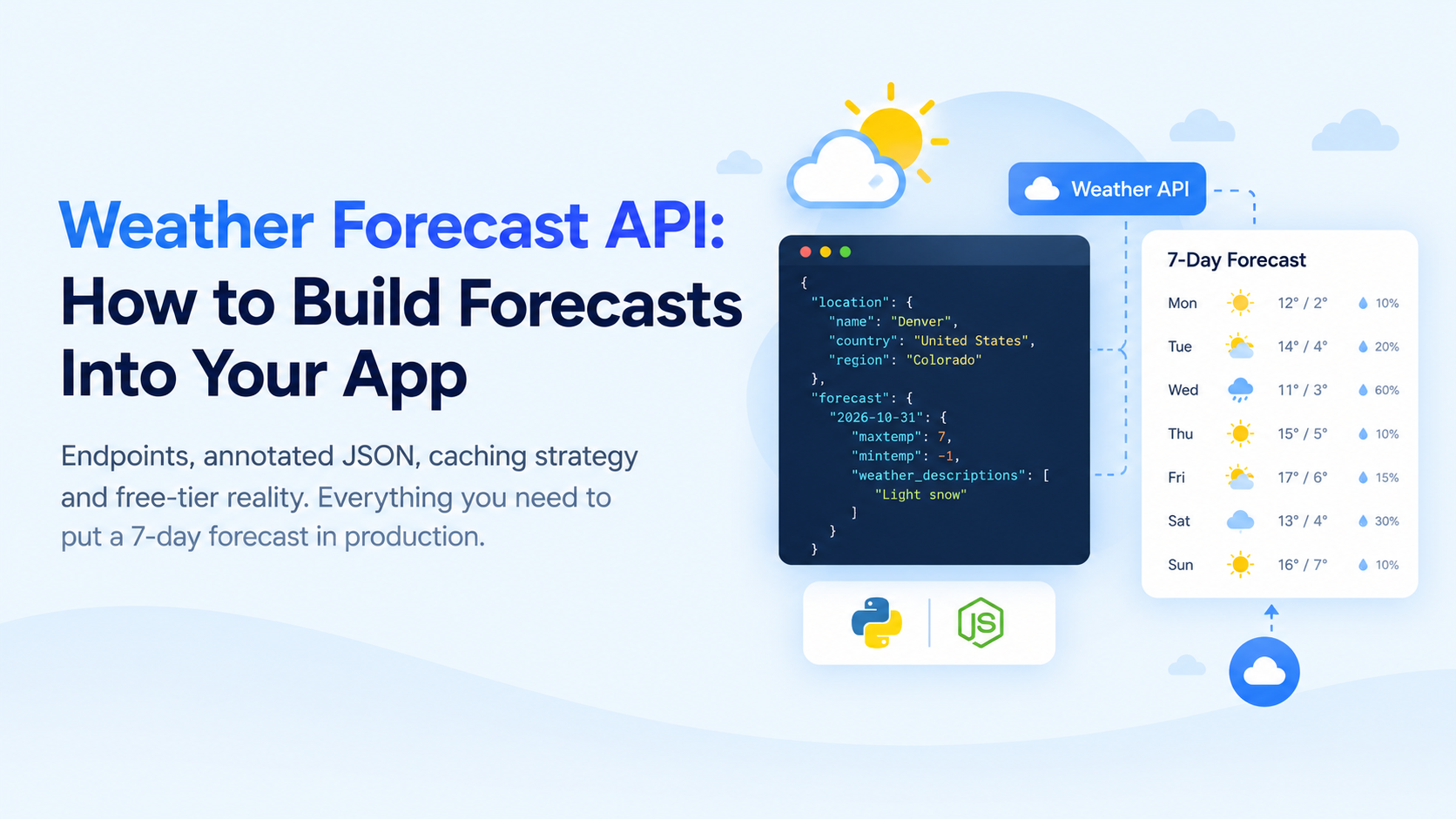
| A weather forecast API returns predicted conditions for a location as JSON: daily highs and lows, precipitation, wind and hourly detail for the coming days. You send a location and the number of days, read the forecast object, cache it per location for about an hour, and render it. Weatherstack includes 7-day forecasts from its Professional plan and 14 days from Business. |
Table of Contents
Key Takeaways
- A forecast request needs three things: a location, the number of days, and units. Everything else is optional detail.
- Weatherstack returns the forecast as an object keyed by date, each with a daily summary (min, max, average, snow, sun hours) and an optional hourly array.
- Forecasts are only updated a few times a day, so caching each location for about an hour cuts API calls dramatically without serving stale data.
- Weatherstack’s free plan covers current weather only. Forecasts start on the Professional plan (7 days); Business and Enterprise extend them to 14 days.
- Keep the API key on a server. The browser should call your own proxy, which adds the key and the cache.
Adding a forecast to an app looks like a single API call, and the first version usually is. The work is in the details: reading the response correctly, staying inside your request budget, and handling the day the API returns an error. This guide covers all of it with complete Python and Node.js code, a front-end snippet and a caching proxy you can deploy. If you have not built with weather data before, start with our JavaScript weather app tutorial, which covers current conditions.
What a forecast API returns
A Weatherstack forecast request uses the forecast endpoint with a location (query) and forecast_days. Adding hourly=1 includes hourly blocks; interval sets their spacing in hours, and interval=24 gives one block per day, which is a convenient way to get a daily description and rain chance. Here is one day of the response, trimmed:
JSON response (one day, trimmed)
{
  "location": {
    "name": "Denver",
    "country": "United States of America",
    "region": "Colorado",
    "lat": "39.739",
    "lon": "-104.984",
    "timezone_id": "America/Denver"
  },
  "current": { "temperature": 12 },
  "forecast": {
    "2026-10-31": {
      "date": "2026-10-31",
      "date_epoch": 1793404800,
      "astro": {
        "sunrise": "07:23 AM",
        "sunset": "05:58 PM",
        "moon_phase": "Waxing Gibbous",
        "moon_illumination": 72
      },
      "mintemp": -1,
      "maxtemp": 7,
      "avgtemp": 3,
      "totalsnow": 1.2,
      "sunhour": 9.1,
      "uv_index": 3,
      "hourly": [
        {
          "time": "0",
          "temperature": 3,
          "wind_speed": 14,
          "wind_dir": "SSW",
          "weather_code": 326,
          "weather_descriptions": ["Light snow"],
          "precip": 0.6,
          "humidity": 45,
          "cloudcover": 80,
          "feelslike": 0,
          "chanceofrain": 20,
          "chanceofsnow": 80
        }
      ]
    }
  }
}The fields you will use most:
| Field | Meaning | Units (units=m) |
|---|---|---|
| forecast | Object keyed by date (YYYY-MM-DD), in date order | – |
| mintemp, maxtemp, avgtemp | Daily low, high and average temperature | °C |
| totalsnow | Total snowfall for the day | cm |
| sunhour | Hours of sunshine | hours |
| uv_index | Daily UV index | index |
| astro | Sunrise, sunset, moon phase | local time |
| hourly[].time | Block start time as HHMM without a colon (“0”, “300”, “1500”) | local time |
| hourly[].weather_descriptions | Text description, such as “Light snow” | – |
| hourly[].chanceofrain, chanceofsnow | Probability of rain or snow in that block | % |
| hourly[].precip | Precipitation amount | mm |
| hourly[].wind_speed, wind_dir | Wind speed and compass direction | km/h |
With units=f you get °F, mph and inches instead. The documentation lists every field.
Your first forecast request
Both versions below read the key from an environment variable, set a timeout, and check Weatherstack’s error object, which arrives in the JSON body rather than as an HTTP error.
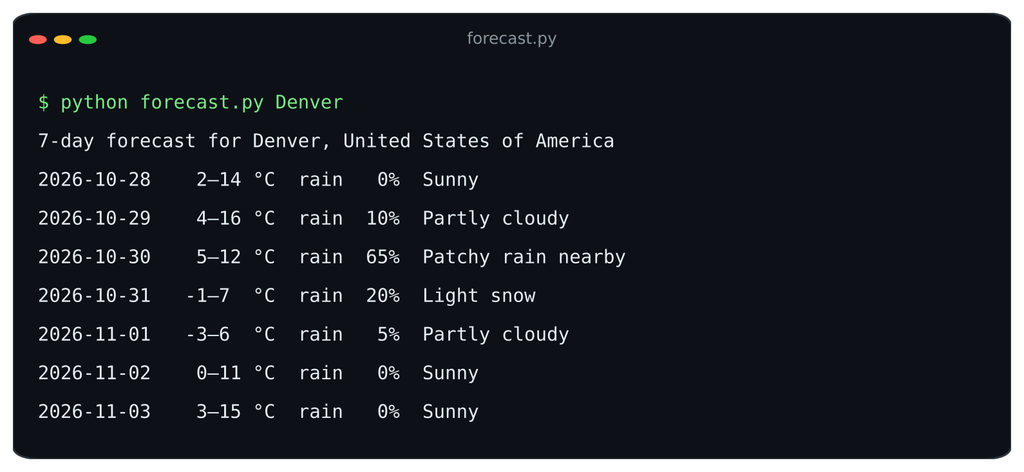
Python
Python (forecast.py), requires: pip install requests
"""Print a 7-day forecast for any city, zip code or coordinates.

Usage:
    export WEATHERSTACK_KEY=your_key_here
    python forecast.py "Denver"
"""
import os
import sys

import requests

API_KEY = os.environ["WEATHERSTACK_KEY"]  # never hardcode the key
API_URL = "https://api.weatherstack.com/forecast"


def get_forecast(query, days=7, units="m"):
    params = {
        "access_key": API_KEY,
        "query": query,
        "forecast_days": days,
        "hourly": 1,
        "interval": 24,   # one hourly block per day = daily description and rain chance
        "units": units,   # m = °C, km/h, mm
    }
    try:
        resp = requests.get(API_URL, params=params, timeout=10)
        resp.raise_for_status()
    except requests.RequestException as exc:
        raise RuntimeError(f"Network error: {exc}") from exc

    data = resp.json()
    if "error" in data:  # Weatherstack reports API errors in the JSON body
        raise RuntimeError(f"API error {data['error'].get('code')}: {data['error'].get('info')}")
    return data


if __name__ == "__main__":
    data = get_forecast(sys.argv[1] if len(sys.argv) > 1 else "New York")
    loc = data["location"]
    print(f"7-day forecast for {loc['name']}, {loc['country']}")
    for date, day in data["forecast"].items():
        block = day["hourly"][0]
        print(
            f"{date}  {day['mintemp']:>3}–{day['maxtemp']:<3}°C  "
            f"rain {block['chanceofrain']:>3}%  {block['weather_descriptions'][0]}"
        )
Node.js
Node 20.6 or newer has fetch and –env-file built in, so there are no dependencies:
Node.js (forecast.js)
// forecast.js: print a 7-day forecast. Run with: node --env-file=.env forecast.js "Denver"
const API_KEY = process.env.WEATHERSTACK_KEY; // from .env, never hardcoded

async function getForecast(query, days = 7, units = "m") {
  const url = new URL("https://api.weatherstack.com/forecast");
  url.search = new URLSearchParams({
    access_key: API_KEY, query, units,
    forecast_days: String(days), hourly: "1", interval: "24",
  });

  const res = await fetch(url, { signal: AbortSignal.timeout(10_000) });
  if (!res.ok) throw new Error(`HTTP ${res.status}`);
  const data = await res.json();
  if (data.error) throw new Error(`API error ${data.error.code}: ${data.error.info}`);
  return data;
}

getForecast(process.argv[2] || "New York")
  .then(({ location, forecast }) => {
    console.log(`7-day forecast for ${location.name}, ${location.country}`);
    for (const [date, day] of Object.entries(forecast)) {
      const block = day.hourly[0];
      console.log(`${date}  ${day.mintemp}–${day.maxtemp}°C  rain ${block.chanceofrain}%  ${block.weather_descriptions[0]}`);
    }
  })
  .catch((err) => {
    console.error(err.message);
    process.exit(1);
});Put WEATHERSTACK_KEY=your_key_here in a .env file next to the script, add .env to .gitignore, and run node –env-file=.env forecast.js Denver.
Free tier reality check
Weatherstack’s free plan includes 100 calls a month of current weather data. It does not include the forecast endpoint. Forecast access starts on the Professional plan with 7 days, and the Business and Enterprise plans extend it to 14 days (pricing). Call the forecast endpoint on a plan without it and the API returns an error object, which the code above reports as a message instead of crashing.
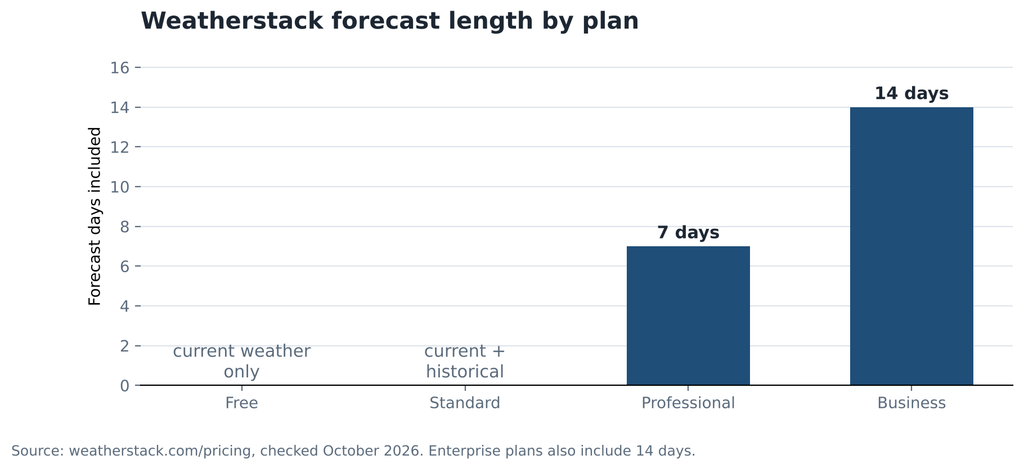
Forecast length by plan, from the Weatherstack pricing page.
If you need a free forecast for a prototype, other providers include short forecasts on their free tiers. Our comparison of free weather APIs lists what each one includes, verified in October 2026.
Rendering a 7-day forecast
The front end should never hold your API key. It calls your own endpoint, /api/forecast, which the proxy in the next section provides. This page and script render seven day cards:
public/index.html
<!DOCTYPE html>
<html lang="en">
<head>
  <meta charset="UTF-8">
  <meta name="viewport" content="width=device-width, initial-scale=1.0">
  <title>7-Day Forecast</title>
  <style>
    body { font-family: system-ui, sans-serif; background: #eef3f8; color: #1d2733; margin: 0; padding: 32px 16px; }
    h1 { margin: 0 0 4px; font-size: 1.4rem; }
    #status { color: #5b6b7c; min-height: 1.4em; }
    #status.error { color: #c62828; }
    .week { display: grid; grid-template-columns: repeat(auto-fit, minmax(110px, 1fr)); gap: 10px; max-width: 900px; }
    .day { background: #fff; border-radius: 12px; padding: 14px; text-align: center; box-shadow: 0 1px 4px rgba(0,0,0,.06); }
    .day .name { font-weight: 700; }
    .day .temps { font-size: 1.2rem; margin: 6px 0; }
    .day .low { color: #5b6b7c; }
    .day .rain { font-size: .85rem; color: #1f6feb; }
    .day .desc { font-size: .85rem; color: #5b6b7c; }
  </style>
</head>
<body>
  <h1 id="title">7-day forecast</h1>
  <p id="status">Loading…</p>
  <div id="week" class="week"></div>
  <script src="forecast.js"></script>
</body>
</html>public/forecast.js
// Calls YOUR proxy (/api/forecast), never the weather API directly.
async function renderForecast(query, units = "m") {
const status = document.getElementById("status");
const week = document.getElementById("week");
const unit = units === "f" ? "°F" : "°C";
try {
const res = await fetch(`/api/forecast?q=${encodeURIComponent(query)}&units=${units}`);
const data = await res.json();
if (!res.ok || data.error) throw new Error(data.error?.info || `HTTP ${res.status}`);
document.getElementById("title").textContent =
`7-day forecast for ${data.location.name}, ${data.location.country}`;
week.replaceChildren(
...Object.values(data.forecast).map((day) => {
const block = day.hourly[0];
const card = document.createElement("div");
card.className = "day";
const name = new Date(`${day.date}T12:00`).toLocaleDateString(undefined, { weekday: "short", day: "numeric" });
card.innerHTML = `
<div class="name"></div>
<div class="temps"><span class="high"></span> <span class="low"></span></div>
<div class="rain"></div>
<div class="desc"></div>`;
card.querySelector(".name").textContent = name;
card.querySelector(".high").textContent = `${day.maxtemp}${unit}`;
card.querySelector(".low").textContent = `${day.mintemp}${unit}`;
card.querySelector(".rain").textContent = `${block.chanceofrain}% rain`;
card.querySelector(".desc").textContent = block.weather_descriptions[0];
return card;
})
);
status.textContent = "";
} catch (err) {
status.textContent = `Forecast unavailable: ${err.message}`;
status.className = "error";
}
}
renderForecast(new URLSearchParams(location.search).get("q") || "Denver");
<figure class="wp-block-image aligncenter">
  <img
    src="https://blog.weatherstack.com/wp-content/uploads/2026/10/image-10-1024x282.png
    alt="Seven-day weather forecast for Denver showing temperatures, rain probability, and weather descriptions"
    class="wp-image-15644"
    width="1024"
    height="282"
  />
</figure>
Each card’s text is set with textContent, so nothing from the API is ever interpreted as HTML. Dates are parsed at noon local time to avoid a time-zone edge case where midnight UTC shows as the previous day.
Caching and request budgeting
Weather models are rerun several times a day, and forecast providers update their output on that rhythm, not every minute. Requesting the same forecast for every page view spends your quota on identical data. A small cache in your proxy fixes this.
server.js (Node 20.6+, run with node --env-file=.env server.js)
// server.js: forecast proxy with an in-memory cache.
// Run with: node --env-file=.env server.js   (Node 20.6 or newer)
const http = require("node:http");
const fs = require("node:fs/promises");
const path = require("node:path");

const KEY = process.env.WEATHERSTACK_KEY;
const TTL_MS = 60 * 60 * 1000; // forecasts change a few times a day; 1 hour is safe
const cache = new Map();       // key: "query|units" -> { expires, body }

async function getForecast(query, units) {
  const cacheKey = `${query.toLowerCase()}|${units}`;
  const hit = cache.get(cacheKey);
  if (hit && hit.expires > Date.now()) return { body: hit.body, cached: true };

  const params = new URLSearchParams({
    access_key: KEY, query, units, forecast_days: "7", hourly: "1", interval: "24",
  });
  const res = await fetch(`https://api.weatherstack.com/forecast?${params}`, {
    signal: AbortSignal.timeout(10_000),
  });
  const data = await res.json();
  if (data.error) throw Object.assign(new Error(data.error.info), { code: data.error.code });

  const body = JSON.stringify(data);
  cache.set(cacheKey, { expires: Date.now() + TTL_MS, body }); // cache successes only
  return { body, cached: false };
}

http.createServer(async (req, res) => {
  const url = new URL(req.url, "http://localhost");

  if (url.pathname === "/api/forecast") {
    const query = (url.searchParams.get("q") || "").trim().slice(0, 100);
    const units = url.searchParams.get("units") === "f" ? "f" : "m";
    if (!query) {
      res.writeHead(400, { "Content-Type": "application/json" });
      return res.end(JSON.stringify({ error: { info: "Missing q parameter." } }));
    }
    try {
      const { body, cached } = await getForecast(query, units);
      res.writeHead(200, { "Content-Type": "application/json", "X-Cache": cached ? "HIT" : "MISS" });
      return res.end(body);
    } catch (err) {
      res.writeHead(502, { "Content-Type": "application/json" });
      return res.end(JSON.stringify({ error: { code: err.code, info: err.message } }));
    }
  }

  // Serve the front end from ./public
  const file = path.join(__dirname, "public", path.normalize(url.pathname === "/" ? "/index.html" : url.pathname));
  if (!file.startsWith(path.join(__dirname, "public"))) { res.writeHead(403); return res.end(); }
  try {
    const type = { ".html": "text/html", ".js": "text/javascript" }[path.extname(file)] || "text/plain";
    res.writeHead(200, { "Content-Type": type });
    res.end(await fs.readFile(file));
  } catch {
    res.writeHead(404); res.end("Not found");
  }
}).listen(3000, () => console.log("Forecast proxy on http://localhost:3000"));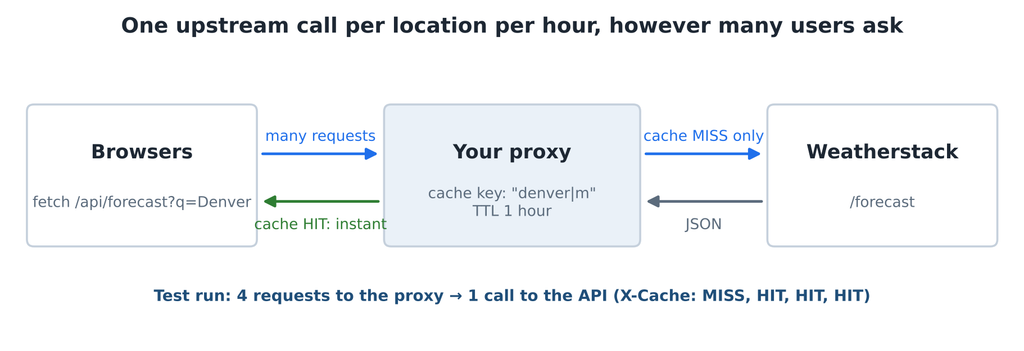
Design notes:
- Cache key = location + units. “Denver” in °C and °F are different responses. Normalize the query (lowercase, trimmed) so “denver” and “Denver ” share an entry.
- Cache only successes. An error should be retried on the next request, not served for an hour.
- The `X-Cache` header shows HIT or MISS, which makes caching easy to verify in the browser’s network tab.
- Memory is fine to start. For several server instances, swap the Map for Redis or your platform’s key-value store with the same TTL.
Reasonable cache lifetimes by data type:
| Data | Suggested TTL | Why |
|---|---|---|
| Current conditions | 10 to 15 minutes | Observations change through the day |
| Hourly forecast | 30 to 60 minutes | Updated several times a day; near hours matter most |
| Daily forecast (7 or 14 days) | 1 to 3 hours | Daily summaries change slowly |
| Historical data | Indefinitely | The past does not change once quality-controlled |
Budget check: with a one-hour TTL, a location that is viewed constantly costs at most 24 forecast calls a day, about 720 a month, however many people view it. Multiply by the number of distinct locations your users request to estimate which plan you need.
Hourly data, alerts and severe weather
Hourly blocks come from the same forecast endpoint: set hourly=1 and choose an interval of 1, 3, 6, 12 or 24 hours. Hourly data counts against the same plan as the forecast itself, so it starts on the Professional plan.
Official severe-weather warnings are a different product. They come from national weather services, and a forecast API’s daily summary is not a substitute for them. For US locations, the National Weather Service publishes active alerts free at https://api.weather.gov/alerts/active?point={lat},{lon} (NWS API docs), with no key, only a User-Agent header. If your app makes safety decisions, use official alerts as the trigger and forecast data as the context around them.
Remember also how forecast accuracy changes with range: days 1 to 3 are far more reliable than days 7 to 14. Our post on how accurate weather forecasts are has the numbers, and they should shape which decisions you automate.
Forecast data that pays for itself
Logistics routing
A regional courier pulls the next 48 hours of hourly forecast for each depot every morning. When a block shows snow chance above 60% or wind above 50 km/h on a route, dispatch adds buffer time to delivery windows and moves time-critical jobs to earlier slots. The decision is concrete: which deliveries to reschedule before customers are let down.
Retail staffing
A chain of garden centres sets weekend staffing from the 7-day forecast. A dry, sunny Saturday above 18°C means extra staff on the tills and in the car park; a wet one means a skeleton crew and a shifted delivery. The forecast is pulled on Wednesday, when rotas are finalised, and rechecked on Friday.
Outdoor events
An event company running outdoor screenings checks each venue’s forecast at 72, 48 and 24 hours out. Rain chance above a set threshold at 48 hours triggers the backup venue booking; at 24 hours it triggers customer notifications. Short-range forecasts drive the costly decisions, longer-range ones only the early warnings.
FAQs
What is a weather forecast API?
A weather forecast API is a web service that returns predicted weather for a location as structured data, usually JSON. You send a location and the number of days, and get daily and hourly temperatures, precipitation, wind and conditions back.
Is there a free forecast API?
Yes. Several providers include short forecasts on free tiers, and the US National Weather Service API is free for US locations. Weatherstack’s free plan covers current weather only; its forecasts start on the Professional plan.
How many days can a weather API forecast?
Most forecast APIs offer 7 to 16 days. Weatherstack offers 7 days on the Professional plan and 14 days on Business and Enterprise. Accuracy drops with range, so days 1 to 3 are the most reliable.
How often should I refresh forecast data?
About once an hour per location for daily forecasts, and every 30 to 60 minutes for hourly forecasts. Forecast models are updated a few times a day, so more frequent requests mostly return the same data.
| Put a forecast in your app. Get a free Weatherstack API key to build and test, then choose a plan with forecast access when you are ready to ship. |