
Your team needs weather data for an app. You search for a provider you already know and come across the AccuWeather API.
It’s a capable API, but choosing one for your project involves more than checking the available weather data. You also need to understand how location lookups work, which plan gives you access to the data you need, and how licensing rules might affect your app.
At Weatherstack API, we regularly hear developers ask these questions. So, in this guide, we’ll compare both APIs, look at their pricing and licensing rules, explain when each one makes sense, and share a simple test plan to help you decide.
One quick note: If you’re comparing OpenWeatherMap instead, check out our Weatherstack vs OpenWeatherMap guide.
Table of Contents
Key Takeaways
- AccuWeather offers more specialised data, including MinuteCast, weather alerts and lifestyle indices.
- Weatherstack makes integration simpler with direct location queries and no separate location key.
- AccuWeather offers a longer free trial, while Weatherstack has a Free plan that doesn’t expire.
Weatherstack vs AccuWeather API at a Glance
AccuWeather offers forecasts, alerts and minute-by-minute precipitation, but most endpoints require a location key and its terms mandate logo attribution. Weatherstack accepts city names, coordinates, ZIP codes or IP addresses directly, without a separate location-key lookup or mandatory logo. Your requirements determine the better fit.
Here’s the quick breakdown:
- Choose AccuWeather if your app needs specialised data such as MinuteCast, lightning information, alerts or lifestyle indices.
- Choose Weatherstack if you want direct location queries, commercial access starting at $9.99 per month, and no mandatory logo.
- Test both first: Build the same weather screen using both APIs and compare the number of calls. We’ll cover this in the testing section.
Before getting into the details, let’s look at the factors that matter when choosing a weather API.
What to Evaluate Before You Write Code
Not all weather APIs work the same way. When choosing a weather data api for your project, pay attention to these things:
- Getting started and authentication: How quickly can you make your first API call?
- Location handling: Does the API accept a location directly, or do you need an additional lookup request?
- Data availability: Is the information you need included in your plan, or does it require an upgrade?
- Bulk and multi-location requests: Can you fetch weather data for multiple locations in one request?
- Pricing: How much will the API cost as your application gets more traffic?
- Free access: Can you test the API without paying upfront?
- Licensing: Check commercial usage, attribution, caching and restrictions on combining data from different providers.
Before comparing plans, list three things: which screens will display weather, what data each screen needs, and how many API calls you expect each month.
These details will help you estimate your actual costs and choose the right plan. You can also check our weather API evaluation checklist for a broader overview.
What should I consider when choosing a weather API for my startup?
Start with the weather data your app needs. Then look at monthly call limits, pricing, licensing rules, integration effort and free access for testing.
With these factors in mind, let’s compare both providers.
Side-by-side Comparison
Plan names, prices and licensing terms can change. We checked the information below on November 15, 2026, using the providers’ official pages. Make sure to check them again before choosing a plan.
| AccuWeather | Weatherstack | |
| Auth method | Bearer key in the Authorization header | access_key query parameter |
| Location input | Location key obtained through a Locations lookup | City, lat,lon, ZIP, IP or fetch:ip directly |
| Current conditions | Yes, using a location key | Yes, /current on all plans |
| Daily forecast range | 5 days (Standard) up to 15 (Elite); 90 on Enterprise | 7 days (Professional); 14 days (Business) |
| Hourly forecast range | 12 hours (Standard) up to 120 (Elite); 240 on Enterprise | Hourly data from Standard, with 1, 3, 6, 12 or 24-hour intervals |
| Historical data | Past 24 hours (Standard to Elite); from 1990 on Enterprise | From Standard; one date or up to 60 days per request |
| Extra datasets | MinuteCast, Lightning, indices, alerts, tropical data and imagery | Astronomy, marine endpoints and autocomplete |
| Bulk queries | One location per request: Most weather endpoints require a single location key for the requested location. | Yes, from Professional |
| Entry paid price | Starter $2/month (non-commercial); Standard $25/month | Standard $9.99/month |
| Free access | 14-day trial, 500 Core Weather calls per day | Free plan: 100 calls/month, current weather only |
| Commercial use | Not on Starter (personal or non-commercial only) | From Standard |
| Attribution | Linked AccuWeather logo on every screen displaying its data | Link back appreciated, but not required |
| Caching rule | Up to two weeks for improving user experience; no other storage rights | No specific cache duration stated in the Terms of Service |
Sources: AccuWeather pricing, AccuWeather documentation, and Weatherstack pricing.
Now, let’s go through the differences, starting with authentication and your first API call.
Getting Started: Keys, Auth and the First Call
AccuWeather: First, sign up and get your API key from the subscriptions page. You’ll need to pass it in the Authorization header using the Bearer format.
The base URL is https://dataservice.accuweather.com. The API supports HTTPS only, and the documentation recommends using the Accept-Encoding: gzip,deflate header.
Unauthorised requests return a 401 response, while a 403 response can indicate subscription restrictions.
Weatherstack: Authentication is a little different here. Pass your API key through the access_key query parameter.
The base URL is https://api.weatherstack.com. HTTPS is available on all plans. Responses are returned in JSON, and you can also use the optional callback parameter for JSONP.
Here’s what a basic request looks like for each API:
# AccuWeather (Input AccuWeather API KEY)
curl -H "Authorization: Bearer YOUR_API_KEY" \
  "https://dataservice.accuweather.com/currentconditions/v1/349727"

# Weatherstack (Input Weatherstack API KEY)
curl "https://api.weatherstack.com/current?access_key=YOUR_ACCESS_KEY&query=New%20York"For more details, check the Weatherstack getting started guide.
AccuWeather’s header-based authentication takes a little more setup if you’re building a browser demo. However, it also keeps your API key out of URLs and URL logs.
Both providers recommend keeping API keys out of client-side code. So, whichever API you choose, use a small server-side proxy to handle requests securely.
As a developer at a travel company, what’s the easiest way to integrate a weather data API?
Choose an API that accepts a location directly, make requests through a small server-side proxy, and cache results by location. With WeatherStack, you can get the data in one call. With AccuWeather, you’ll need to look up and cache the location key first.
And that’s where we get to one of the biggest differences between these APIs.
Location Handling: Location Keys vs Direct Queries
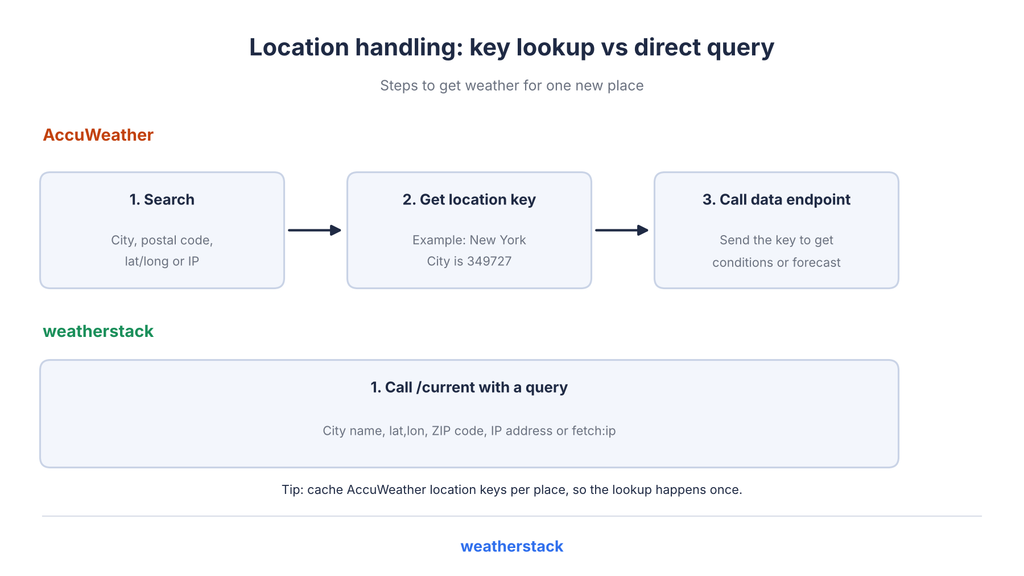
AccuWeather: Most endpoints, including current conditions, forecasts, alerts, indices and imagery, require a location key.
You first need to get that key using one of the Locations API endpoints:
- /locations/v1/cities/search
- /locations/v1/postalcodes/search
- /locations/v1/poi/search
- /locations/v1/cities/geoposition/search (latitude and longitude)
- /locations/v1/cities/ipaddress
For example, San Francisco returns the location key 347629, while New York City returns 349727.
Source: AccuWeather location keys
Weatherstack: You don’t need a separate location lookup for regular weather requests.
The query parameter accepts a city name, lat,lon coordinates, ZIP code, IP address or fetch:ip. You can use it directly with the /current, /forecast and /historical endpoints.
There’s also an /autocomplete endpoint if your application needs a location search box.
It returns up to 200 matches (20 by default), with fields such as name, country, region, lat, lon, timezone_id and utc_offset. You can use major=1 to limit the results to major cities.
According to the pricing page, autocomplete is available from the Standard plan.
What does this mean for your API call budget?
With AccuWeather, your first request for a new location involves two steps: a location lookup and a weather data request.
The good news is that location keys are stable, so you can cache them and reuse them for future requests. This means the additional lookup cost is mostly limited to the first time you encounter a location.
One more thing: if you’re calculating local times using their GMTOffset value, pay attention to the NextOffsetChange property. It helps you account for changes in the local UTC offset.
What’s the best API for current weather conditions by city or coordinates?
Both APIs support this. Weatherstack accepts a city name or coordinates directly through /current. AccuWeather requires a location key, which you first get through a city or geoposition search. If you want fewer steps, Weatherstack has the simpler approach.
Which weather API supports location autocomplete?
Weatherstack provides an /autocomplete endpoint from its Standard plan. It can return up to 200 location matches. AccuWeather offers location search through its Locations API.
Once you’ve identified the location, the next thing to consider is the weather data each API provides.
Current Conditions, Forecasts and History
AccuWeather provides several daily forecast endpoints:
- /forecasts/v1/daily/1day
- /forecasts/v1/daily/5day
- /forecasts/v1/daily/7day
- /forecasts/v1/daily/10day
- /forecasts/v1/daily/15day
You’ll need to append the location key to the endpoint. Optional parameters include language, details and metric.
For hourly forecasts, the available intervals include 1, 12, 72 and 120 hours. Daily forecast responses also include information such as sunrise, sunset and moon phases.
The available forecast range depends on your plan:
- Standard: 5-day daily and 12-hour hourly forecasts.
- Prime: 10-day daily and 72-hour hourly forecasts.
- Elite: 15-day daily and 120-hour hourly forecasts.
- Enterprise: 90-day daily and 240-hour hourly forecasts.
Historical conditions cover the past 24 hours on Standard, Prime and Elite plans. Enterprise provides historical data going back to 1990.
Sources: AccuWeather pricing and AccuWeather documentation.
Weatherstack offers three main endpoints for weather information:
- /current for current weather conditions.
- /forecast for forecasts, with forecast_days from 1 to 14, hourly set to 0 or 1, and interval set to 1, 3, 6, 12 or 24 hours.
- /historical for historical weather data.
The historical endpoint supports a single date or up to 60 days in one request using historical_date_start and historical_date_end.
You also get /marine and /past-marine endpoints. Other available options include units (m, s or f) and language settings.
Check the Weatherstack API reference for the complete list of parameters and response fields.
Here’s how the features are divided across plans:
- Free: Current weather only.
- Standard: Historical, hourly and astronomy data.
- Professional: 7-day forecasts and bulk queries.
- Business: 14-day forecasts.
Each forecast day includes an astro object with sunrise, sunset, moonrise, moonset, moon_phase and moon_illumination. The response also includes a location object with timezone_id and utc_offset.
There are a couple of differences worth mentioning.
AccuWeather offers longer hourly forecast ranges on Prime and higher plans. Its Enterprise plan also provides a 90-day daily forecast.
On the other hand, Weatherstack gives you access to historical data beyond the past 24 hours starting with its Standard plan.
Weatherstack’s API reference also includes air quality fields. However, its pricing page doesn’t list air quality as a feature on any plan, so we haven’t treated it as a confirmed plan feature in this comparison. AccuWeather, on the other hand, lists air quality as an Enterprise feature.
Which weather API returns 7-day or 14-day forecasts?
Weatherstack provides a 7-day forecast on Professional and a 14-day forecast on Business. AccuWeather offers 5 days on Standard, 10 on Prime, 15 on Elite and 90 on Enterprise.
Forecasts cover most basic app requirements, but some projects need additional weather datasets. Let’s look at what else AccuWeather offers.
Extra Datasets AccuWeather Offers
AccuWeather has a wider selection of specialised weather data. Here’s a quick look at what’s available:
- MinuteCast: Minute-by-minute precipitation forecasts for the next two hours. It’s sold separately, with Lite at $25/month for 10,000 calls and Full at $100/month for 675,000 calls.
- Lightning: Forecasts and strike data on Enterprise, with 50 trial calls per day.
- Lifestyle and health indices: More than 50 indices.
- Severe weather alerts: Government-issued alerts from Prime and higher plans.
- Tropical cyclones and imagery.
- Translations: Support for more than 200 languages and dialects.
- MCP server: Available on Elite and Enterprise.
Weatherstack doesn’t list minute-level precipitation, lightning forecasts, lifestyle indices or severe weather alerts.
So, if your application depends on any of these features, AccuWeather is the better fit.
However, Weatherstack also offers marine endpoints (/marine and /past-marine) with tide data from its standard plan. AccuWeather lists tidal data under its Enterprise plan.
If your application needs to track weather across several locations, there’s another feature worth checking: bulk requests.
Bulk Requests and Many Locations
Weatherstack: Weatherstack supports bulk queries, allowing you to request weather data for multiple locations in a single API call. Separate locations with semicolons in the query parameter.
This feature is available on the Professional plan and higher. Requests made with a Free plan key return error 604 (bulk_queries_not_supported_on_plan). Each location in a bulk query counts toward your monthly request allowance. Bulk queries reduce HTTP round trips, but they don’t reduce the number of locations counted against your quota.
AccuWeather: AccuWeather’s Core Weather API uses location-specific endpoints. Each weather data request requires a location key in the endpoint URL. The documented endpoints do not provide a bulk parameter for retrieving weather data for multiple locations in a single request.
For applications retrieving weather data across multiple locations, plan for individual location requests with the documented Core Weather endpoints.
Regardless of which API you choose, you can reduce unnecessary calls with a few practical optimisations.
Group users checking the same location, round coordinates to a suitable grid, and reuse cached responses where the provider’s terms permit it. This allows multiple users to share the same weather response instead of generating duplicate API calls.
What’s the best weather API with a bulk endpoint for many locations?
Weatherstack is the stronger option if bulk requests are a priority. Its Professional plan and higher support multiple locations in a single API call using semicolon-separated queries. The Core Weather API endpoints we reviewed from AccuWeather use individual location keys instead.
Now let’s look at pricing, another important factor when choosing a weather API.
Pricing, Free Access and Call Budgets
AccuWeather Core Weather:
- Starter: $2/month for 15,000 calls.
- Standard: $25/month for 225,000 calls.
- Prime: $250/month for 1,800,000 calls.
- Elite: $500/month for 2,400,000 calls.
- Enterprise: Custom pricing.
The Starter plan is limited to personal or non-commercial use.
Overage charges are calculated using CPM rates:
- Starter: $0.25 CPM.
- Standard: $0.12 CPM.
- Prime: $0.15 CPM.
- Elite: $0.22 CPM.
Weatherstack:
- Free: $0/month for 100 calls, non-commercial use and current weather only.
- Standard: $9.99/month for 50,000 calls.
- Professional: $49.99/month for 300,000 calls.
- Business: $99.99/month for 1,000,000 calls.
- Enterprise: Custom pricing.
Yearly billing reduces the monthly cost. For example, Standard costs $8.99, Professional $43.99 and Business $84.99 per month when billed annually.
Overage charges are calculated per additional request:
- Standard: $0.0007992 per call.
- Professional: $0.0006665333 per call.
- Business: $0.00039996 per call.
Free access: How do they compare?
AccuWeather offers a 14-day free trial with 500 Core Weather calls per day. MinuteCast and Lightning each have 50 calls per day during the trial.
The pricing page says you don’t need a credit card to start. According to the AccuWeather FAQ, a trial day is calculated as a rolling 24-hour period from your first request, so check the latest terms before starting.
This gives you more room to test the API over a short period.
Weatherstack, on the other hand, has a Free plan that doesn’t expire. However, it only includes 100 calls per month and current weather data.
If you want to explore other options, check our guide to the best free weather APIs in 2026.
A worked example using published prices
Here’s how the plans compare at different monthly call volumes:
| Monthly calls | Weatherstack | AccuWeather |
| About 50,000 | Standard, $9.99 (hourly and historical data) | Standard, $25 for 225,000 calls (5-day forecast) |
| About 300,000 | Professional, $49.99 (7-day forecast, bulk) | Standard plus overage, or Prime at $250 (10-day forecast) |
| About 1,000,000 | Business, $99.99 (14-day forecast) | Standard plus overage, or Prime at $250 (10-day forecast) |
Note: CPM (cost per thousand) is the overage charge for every 1,000 API calls beyond your plan’s monthly allowance. AccuWeather applies these charges at the end of the billing cycle.
One important thing to remember: count API calls per screen, not just per user.
For example, a screen showing current conditions and a daily forecast through AccuWeather needs two data requests, plus a location lookup if you haven’t cached the key.
With Weatherstack, the same screen needs only one /forecast request.
Weatherstack vs AccuWeather API: which is better value?
Weatherstack offers a lower starting price for commercial use, while the other provides specialised datasets and longer forecast ranges on higher plans. The better value depends on your required features and monthly call volume. Use the comparison above to identify the lowest suitable plan.
What’s the pricing model for weather APIs?
Both providers offer subscription plans with monthly request allowances and overage charges. AccuWeather calculates overages using CPM (cost per thousand calls), while Weatherstack charges per additional request. Estimate your expected usage before comparing plans.
Is there a free weather API with a usable free tier?
Yes. Weatherstack offers an ongoing Free plan for testing current weather data, while AccuWeather provides a more generous, time-limited trial. Neither option is intended for unrestricted commercial production use. Compare their allowances and licensing terms in the pricing section above.
I’m a head of analytics in the energy space. What’s the most affordable way to integrate a weather data API?
Estimate API usage by location and refresh frequency, cache shared responses where permitted, and use bulk queries when available. Then choose the lowest-priced plan that supports your required data and expected call volume. The worked examples above provide a starting point for comparing costs.
Pricing is important, but there’s another thing you shouldn’t overlook: the licensing terms.
Licensing, Attribution and Caching
Before designing your application, take some time to read the licensing terms. They can affect everything from how you display weather information to how long you can store it.
The following points are based on each provider’s published terms. Having attribution requirements isn’t necessarily a problem, but you should know about them before building your app.
AccuWeather
- Attribution: You must display the AccuWeather logo with a link to accuweather.com on every page or screen where AccuWeather data appears.
- Caching and storage: You can cache data for up to two weeks to improve the user experience. However, the licence doesn’t allow you to store the data for other purposes or build an archive or database from it. You must also delete the data when your subscription ends.
- Other restrictions: You cannot combine AccuWeather data with other weather information. This means you can’t use a mixed-provider fallback without checking the applicable licensing terms. The licence also excludes advertising targeting or triggering, connected-car and telematics applications, broadcasting and mission-critical uses. The Starter plan is limited to personal or non-commercial use, and packages are non-refundable.
Source for these restrictions: AccuWeather Terms of Use (last updated April 28, 2026).
AccuWeather’s best practices documentation also recommends respecting the Expires response header and randomising device refresh times.
Weatherstack
- The Free plan is for non-commercial use. Commercial usage starts with the Standard plan.
- According to the Weatherstack terms, last modified on May 9, 2019, including a clickable link to weatherstack.com is appreciated but not required.
- The terms limit how you can use and share the data. Your application can display it to individual end users, but you cannot transfer it outside your applications or allow users to distribute or exploit it for other purposes.
- The published terms don’t specify a fixed caching limit.
Which weather API allows commercial use of its data?
Weatherstack supports commercial use from its Standard plan, which starts at $9.99/month. AccuWeather’s Starter plan is limited to personal or non-commercial use. Make sure you review the terms for the higher plans before using either API commercially.
What’s the best weather API for ecommerce weather-based promotions?
Read the licensing terms before building anything. AccuWeather’s licence excludes advertising targeting or triggering. Weatherstack also restricts how its data can be used and shared. Check whether your planned promotions fit within the applicable terms.
Now that we’ve covered the technical and licensing differences, let’s look at when you should choose each provider.
When to Choose Each
The right choice depends on your application’s data needs, budget and integration requirements.
Choose AccuWeather when your app needs specialist data
AccuWeather is a better fit when:
- You need MinuteCast, lightning data, lifestyle indices, severe weather alerts or tropical weather information.
- You require longer hourly forecasts (72–120 hours) or 90-day forecasts on Enterprise.
- You want a 14-day trial with 500 daily calls before committing.
- AccuWeather’s mandatory logo attribution fits your app’s design.
Choose Weatherstack when you want a simpler build (an AccuWeather API alternative for lean teams)
Weatherstack is a better fit when:
- You want direct city, coordinate, ZIP or IP queries without separate location lookups.
- You need historical and astronomy data or autocomplete, available from the Standard plan.
- You need bulk queries (Professional+) or 14-day forecasts (Business, $99.99/month for 1 million calls).
- You prefer not to display a mandatory logo on weather screens.
Note: It doesn’t offer minute-level precipitation, lightning forecasts, lifestyle indices or severe weather alerts. Its Free plan provides only current weather data, limited to 100 calls per month.
What are the best alternatives to the AccuWeather API?
It depends on which AccuWeather features you need. If your application relies on its specialised datasets, AccuWeather may be the better choice. If you need current, historical and forecast data with direct location queries, Weatherstack is another option. You can use the testing steps below to compare them.
Once you’ve shortlisted your options, it’s time to try them in your own project.
How to Test Both During Development
The easiest way to compare two APIs is to build something with both. Here’s a five-step test plan you can follow.
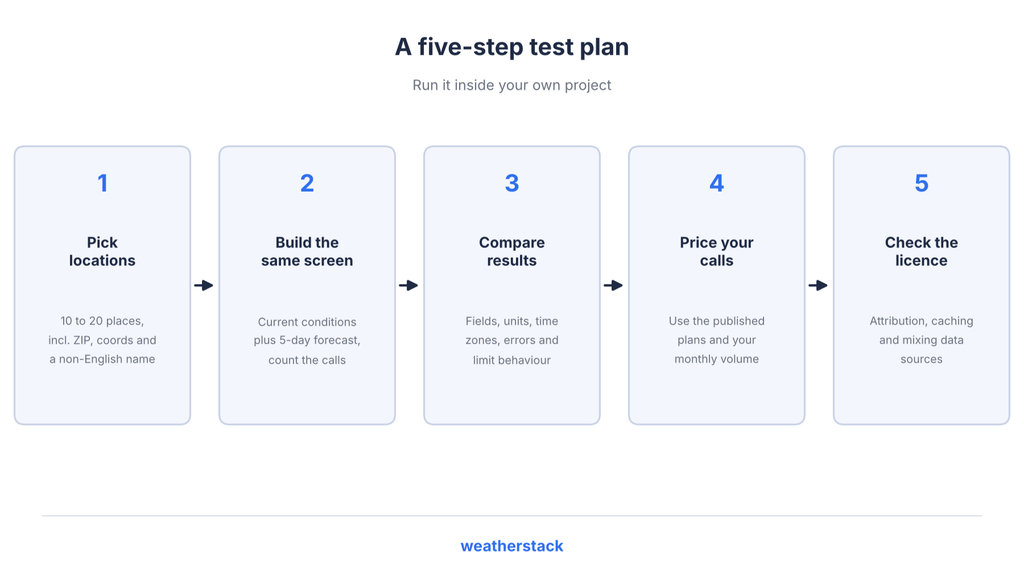
- Choose your test locations. Pick 10 to 20 locations that matter to your users. Include a ZIP code, coordinates and at least one place name in a non-English language.
- Build the same screen with both APIs. Start with current conditions and a 5-day forecast. Count how many requests each API needs, including AccuWeather’s location lookup requests.
- Compare the responses. Check the fields you display, units, time zone handling, error responses and what happens when you reach your monthly limit. For example, Weatherstack returns error 104 (usage_limit_reached) when the usage limit is reached.
- Estimate the monthly cost. Use your expected call volume and compare the published plans. The pricing example above should give you a starting point.
- Review the licensing terms. Check whether your design meets the attribution requirements, caching restrictions and rules around combining data from different sources.
A weather api comparison is most useful when you test the APIs as part of your own development process.
There’s an important restriction to consider before evaluating AccuWeather. Its Terms of Use prohibit using its API or data to rate, rank, review, or otherwise evaluate AccuWeather, its services, or products. Review these terms carefully before conducting comparative tests or publishing content that evaluates the service.
Let’s finish with a quick verdict.
Verdict: Weatherstack vs AccuWeather
AccuWeather is a strong choice for applications requiring specialised datasets such as MinuteCast, lightning information and severe weather alerts.
Weatherstack is a better fit for developers seeking simpler integration, predictable pricing and flexibility. It supports direct location queries without a separate location-key lookup, offers historical and forecast data, and doesn’t require mandatory logo attribution.
With commercial plans starting at $9.99/month, Weatherstack is particularly suitable for startups and growing teams looking to integrate weather data without unnecessary complexity.
Explore our weather API to find the right solution for your application.
Ready to get started? Get a free Weatherstack API key and test the integration. Note that the Free plan supports current weather only.
FAQ
Here are answers to common questions about both weather API providers.
Is the AccuWeather API free?
AccuWeather offers a 14-day free trial with 500 Core Weather calls per day. After the trial, its Starter plan costs $2/month for 15,000 calls and is limited to personal or non-commercial use. Check the pricing page before signing up, as plans can change.
How much does the AccuWeather API cost?
AccuWeather’s paid plans start at $2/month for non-commercial use, while commercial plans start at $25/month. Higher tiers offer more requests and features, with additional usage charged through CPM-based overages. MinuteCast is priced separately. See the website’s pricing page for current rates.
Do I need a location key to use the AccuWeather API?
Yes, most AccuWeather endpoints require a location key. You can get one through a Locations API search using a city, postal code, coordinates or IP address. Once you have it, cache the key and reuse it. Weatherstack accepts the location directly through its query parameter.
Can I cache AccuWeather API data?
AccuWeather allows caching for up to two weeks to improve the user experience. However, its terms don’t allow you to store or archive the data for other purposes. Check the AccuWeather Terms of Use for the complete restrictions.
Is Weatherstack a good AccuWeather API alternative?
Yes, if your application needs current, historical and forecast weather data with direct location queries and commercial usage starting at $9.99/month. However, AccuWeather is a better fit if you need specialised features such as MinuteCast, severe weather alerts or lifestyle indices.
Does Weatherstack require attribution?
No. Weatherstack’s terms say that including a link to its website is appreciated but not required. AccuWeather, on the other hand, requires its linked logo wherever its weather data appears.