
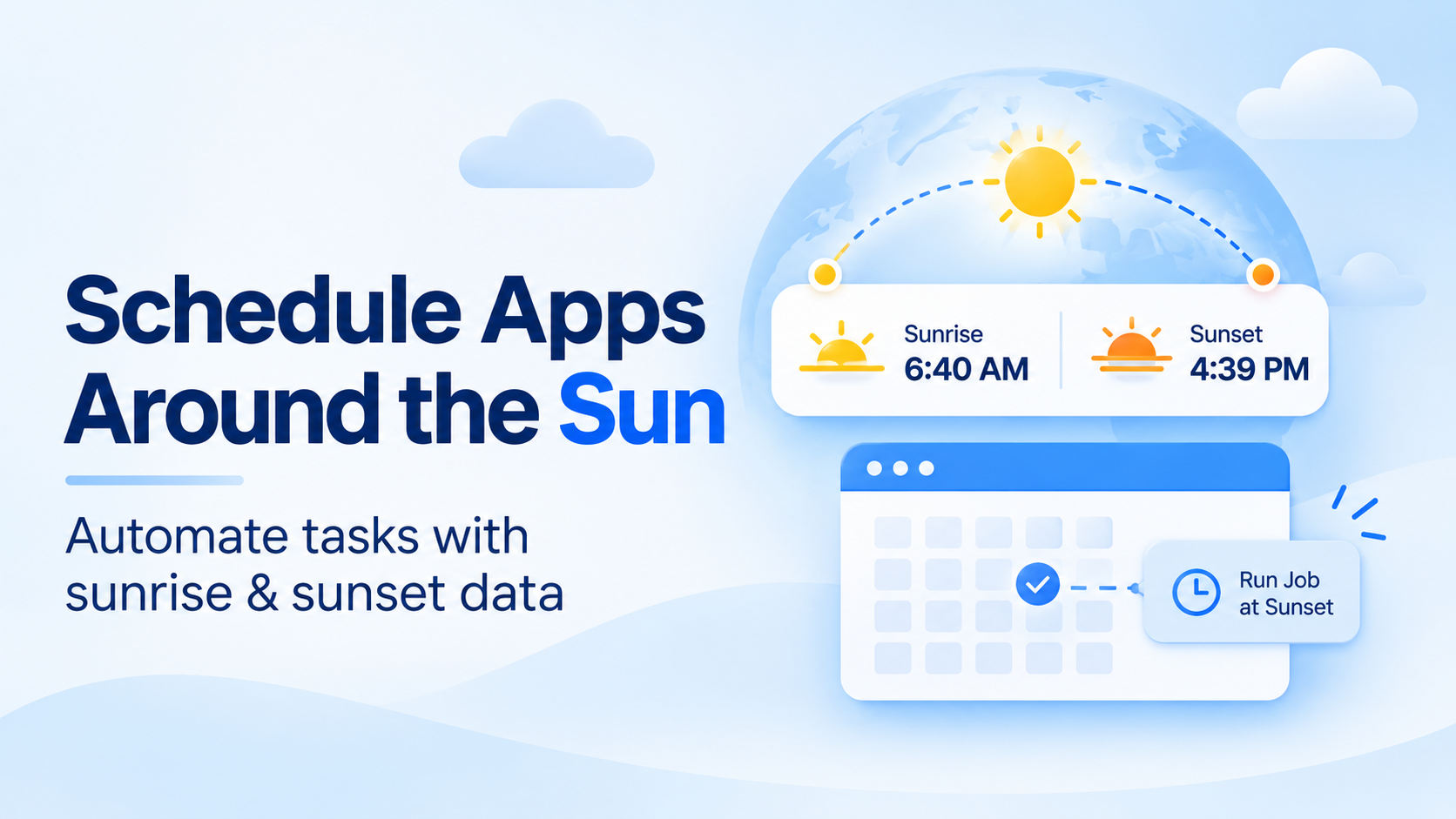
Say you’re building a lighting controller. You set a cron job to run at 6:00 PM, and everything works fine in October. By December, it runs too late. By June, it runs hours too early, while there’s still plenty of sunlight in the room.
Nothing is wrong with your code. The problem is that the sun doesn’t follow your clock.
This guide shows how to use a sunrise sunset API to handle twilight, time zones and DST, then build a reliable daylight-based scheduling workflow.
Table of Contents
Key Takeaways
- A fixed-time cron job slowly gets out of sync with actual sunrise and sunset times.
- Get daylight times for each location and schedule jobs around them (for example, 30 minutes before sunset).
- Refresh the data once a day and cache it so your scheduler doesn’t have to wait for an API request.
- Sunset isn’t the same as dark. Pick the right trigger: sunset, civil, nautical or astronomical twilight.
- Convert local sunrise and sunset times to UTC with the location’s IANA time zone before scheduling anything.
- Plan for days with no sunrise or sunset near the poles, and define a fallback.
What Sunrise and Sunset Data Includes
A sunrise sunset API returns predicted local sunrise and sunset times for a location and date. These mark when the sun’s upper edge crosses the horizon, accounting for average atmospheric refraction. The location’s time zone is needed to convert these clock times into accurate scheduling triggers.
These times are calculated predictions, not direct observations. Atmospheric conditions, latitude and the local landscape can affect when the sun actually becomes visible.
Depending on the API, responses may also include moonrise, moonset, moon phase, moon illumination and time-zone information. Sunrise and sunset values are often returned as local clock times rather than UTC timestamps.
Why Schedule by Daylight Instead of Fixed Clock Times?
Fixed-time cron jobs run at the same clock time all year, but sunrise and sunset don’t. They change with the seasons, your location, and your latitude. That means a fixed schedule will only match the actual daylight times on a few days of the year.
The chart below shows local sunset times throughout 2025 for three cities. The dashed line represents a job scheduled for 6:00 PM.
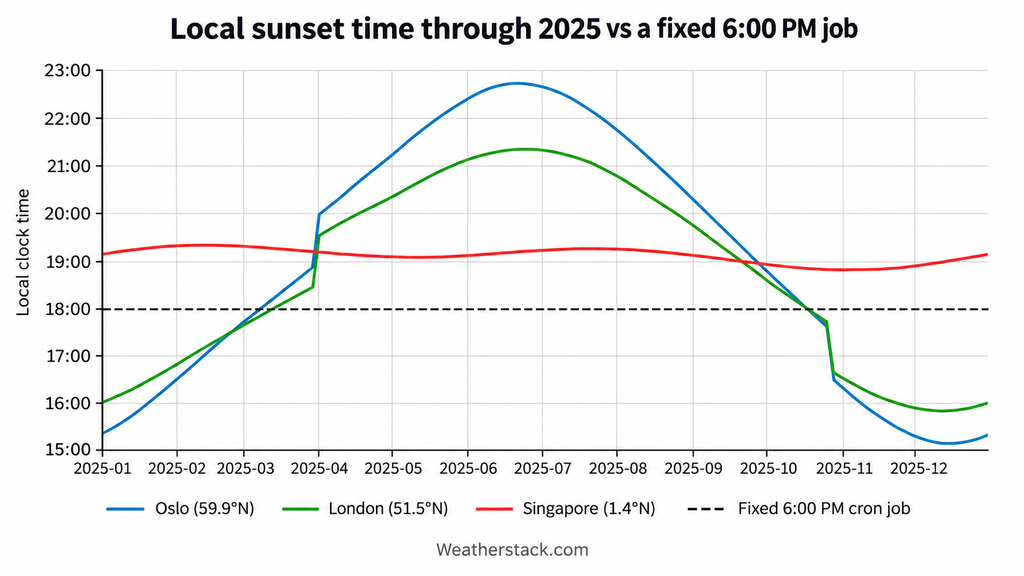
Look at Oslo. Sunset is around 3:10 PM in winter and 10:43 PM in summer. A 6:00 PM job runs almost three hours too late in December and almost five hours too early in June.
Singapore has very little variation, so a fixed time might seem to work there. That’s the catch. A schedule that works in one city can cause problems when your app runs somewhere else.
Latitude also affects how much daylight changes throughout the year. Near the equator, days stay close to 12 hours, while higher-latitude locations experience much larger seasonal differences. That’s why daylight-based triggers should use each location’s daily sunrise and sunset times.
Where Daylight-Based Scheduling Helps
Many kinds of applications need to act on daylight rather than on a clock:
- Smart and outdoor lighting. Turn porch, street or garden lights on at sunset and off at sunrise.
- Irrigation and other IoT controllers. Water early in the morning, before the sun gets strong, to reduce evaporation.
- Solar monitoring and battery charging. Expect production between sunrise and sunset, and plan charging or discharging windows around them.
- Photography and drone apps. Show golden hour, and flag flying windows where local rules limit flights to daylight hours.
- Outdoor sports and events. Set start times, cutoffs and lighting for matches, races and festivals.
- Notification quiet hours. Hold non-urgent notifications until after sunrise in the user’s location.
- Field-crew shift planning. Fit outdoor work into the hours of usable light.
What each of these needs from a weather API is similar: daily sunrise and sunset times, the location’s time zone, and often a forecast a few days ahead.
What’s the best weather API for a smart home or IoT dashboard?
Pick one that returns sunrise, sunset and the location’s time zone in the same response as current conditions. That lets a dashboard show the weather and schedule lights or devices from one call per location. Bulk queries help if you manage many homes or sites.
Which weather API is best for energy and solar forecasting apps?
Solar apps need sunrise and sunset to bound the production window, plus hourly forecasts of cloud cover and temperature for the next few days. Choose an API that offers both astronomy data and hourly multi-day forecasts, and check which plan includes them.
Which weather API is best for agriculture and farm management apps?
Farm apps need daily sunrise and sunset for irrigation and field work, plus precipitation, temperature and humidity forecasts. A multi-day forecast with daily and hourly values, queried by coordinates for each field, covers most needs.
What’s the best weather API for an events or outdoor activity app?
Events apps need sunset times to plan lighting and cutoffs, and a forecast covering the event date. Look for an API with forecasts at least a week ahead, sunrise and sunset per day, and lookups by place name or coordinates.
What’s the best weather API for a mobile app?
A mobile app needs fast JSON responses, lookups by coordinates or IP, and the location’s time zone so times display correctly. Call the API from your backend and cache results per location, so you don’t expose your key or spend a request on every app launch.
Sunrise vs Twilight: Pick the Right Trigger
Sunset isn’t the same as darkness. Twilight continues after sunset and before sunrise, providing different levels of natural light.
For daylight-based scheduling, the right trigger depends on how much light your application needs. The twilight stages below are defined by the sun’s position relative to the horizon.
| Event | Sun position | What you can see | Typical use |
| Sunrise and sunset | Upper edge of the sun on the horizon | Usable daylight varies with conditions and surroundings | Lights on, blinds closed, solar production window |
| Civil twilight | Center of the sun up to 6° below the horizon | Enough light for most outdoor activities without artificial light | Outdoor-activity cutoffs, street lighting, field work end times |
| Nautical twilight | 6° to 12° below the horizon | Horizon still visible at sea, outdoor work needs light | Marine and navigation apps, security lighting |
| Astronomical twilight | 12° to 18° below the horizon | Sky dark enough for most stargazing | Astronomy, dark-sky and astrophotography apps |
In practice:
- Lights usually belong at or shortly after sunset.
- Outdoor activity cutoffs often belong at the end of civil twilight (civil dusk).
- Astronomy and dark-sky apps should wait for the end of astronomical twilight.
One thing to be careful about: twilight length changes with latitude and season. At high latitudes in summer, civil twilight can last for hours, or all night. So don’t hard-code “30 minutes after sunset” as if it were civil dusk. If your product needs true twilight times, calculate them from the sun’s position or use a source that returns them.
Time Zones, UTC Offsets and Daylight Saving Time
A sunrise string like “07:49 AM” only means something once you know the date and the time zone. This is the step most tutorials skip, and it’s where daylight schedulers usually break.
Local Time vs UTC
The rule is simple: store and schedule in UTC, and display in local time.
Sunrise and sunset APIs often return local clock times for a particular place and date. Before you schedule anything, combine the local date, the local time and the location’s time zone, then use a time-zone-aware library to convert the result into a UTC instant before creating the scheduled job. Your scheduler then works with one unambiguous timeline, no matter where your servers or devices are.
Store the IANA time zone name, such as Europe/Oslo or America/New_York, not just a numeric offset like +01:00. Offsets change when daylight saving time starts or ends, and governments change the rules from time to time. The IANA time zone database tracks those changes and is updated several times a year, and libraries such as Python’s zoneinfo use it.
DST Transition Days
In the US, daylight saving time starts at 2:00 a.m. on the second Sunday of March and ends at 2:00 a.m. on the first Sunday of November (NIST). In spring, clocks jump from 2:00 to 3:00 a.m., so that hour is skipped. In autumn, the 1:00 a.m. hour happens twice.
That causes three kinds of bugs:
- A job set for a local time inside the skipped hour never runs.
- A job set inside the repeated hour can run twice.
- A server cron that runs in the server’s own time zone drifts by an hour against the device’s time zone when only one of them changes.
Other countries switch on different dates, and some don’t use DST at all. So don’t assume one calendar for every location.
The fix is to recompute each day’s trigger times from that day’s data, convert them with a time zone library, and never add a fixed offset by hand. Sunrise and sunset themselves rarely fall in the skipped or repeated hour, but offsets such as “sunrise minus 90 minutes” can.
Edge Cases that Break Daylight Schedulers
A scheduler that works in London in October can still fail elsewhere. Plan for these cases before you ship.
- Polar day and polar night. Above the Arctic Circle, the sun doesn’t set around the June solstice, and the North Pole has about six months of continuous daylight followed by six months of night (NSIDC). On those days, there may be no sunrise or sunset value at all. Your code must handle an empty or non-time value instead of crashing.
- Lower accuracy at high latitudes. Sunrise and sunset are calculated predictions, not observations. NOAA says its calculations are accurate to within about a minute between 72° north and south, but only within about 10 minutes closer to the poles, where the sun crosses the horizon at a shallow angle (NOAA). Real values also vary with air conditions.
- Local terrain. Standard times assume a flat horizon. Hills, buildings and elevation change when a user actually sees the sun.
- Location ambiguity. A city name can match more than one place, such as Portland, Oregon and Portland, Maine. Geocode each location once, store its coordinates, and query by coordinates from then on.
- Local date vs UTC date. An evening sunset in the Americas can fall on the next UTC date. Always build the instant from the local date plus the time zone, never from the UTC date.
What should the scheduler do when there’s no valid time?
When a sunrise or sunset value is missing, use a defined fallback such as a fixed local time or safe device state. Log fallback events and alert on repeated failures.
Where to Get Sunrise and Sunset Times
There are two main ways to obtain sunrise and sunset times for application scheduling: calculate them locally or retrieve them through an API.
Calculate Them Yourself
Solar-position algorithms and libraries can calculate sunrise, sunset and twilight times from a location’s coordinates and date. This approach works well for embedded devices that need to operate without an internet connection.
However, you need to maintain the calculations, time-zone data and edge-case handling yourself. If you’d rather use a hosted service, compare the best free weather APIs in 2026.
Use a Sunrise Sunset API: weatherstack
For applications that also need weather data, weatherstack provides sunrise and sunset information alongside location and time-zone details. Its weather forecast API can support daylight-based scheduling without requiring you to maintain solar-position calculations yourself.
Getting Sunrise and Sunset Times From the Forecast API
Weatherstack’s /forecast endpoint returns daily forecast data, including an astro object with sunrise, sunset, moonrise, moonset and moon phase information. The response also includes location and time-zone details, allowing applications to schedule daylight-based actions for multiple days.
curl --get "https://api.weatherstack.com/forecast" \
  --data-urlencode "access_key=YOUR_ACCESS_KEY" \
  --data-urlencode "query=40.71,-74.01" \
--data-urlencode "forecast_days=3"The API returned a three-day forecast for New York. Here’s a trimmed response from November 13, 2026, showing the location’s time zone and one day’s astronomy data:
{
  "location": {
    "name": "New York",
    "timezone_id": "America/New_York",
    "utc_offset": "-5.0"
  },
  "forecast": {
    "2026-11-13": {
      "date": "2026-11-13",
      "astro": {
        "sunrise": "06:40 AM",
        "sunset": "04:39 PM",
        "moonrise": "10:51 AM",
        "moonset": "07:46 PM",
        "moon_phase": "Waxing Crescent",
        "moon_illumination": 12
      }
    }
  }
}For additional request parameters and response fields, see the weatherstack forecast endpoint documentation.
Weatherstack provides sunrise and sunset times, but not civil, nautical or astronomical twilight times. Calculate those separately if your application requires them. For a complete integration walkthrough, see our guide on how to build forecasts into your app.
Which Plan You Need
Daylight data isn’t on every plan, so check this before you build. According to the weatherstack plans page:
| Plan | Price per month | Requests per month | What it adds |
| Free | $0 | 100 | Current weather only |
| Standard | $9.99 | 50,000 | Astronomy (sunrise and sunset), historical and hourly data, commercial use |
| Professional | $49.99 | 300,000 | 7-day forecast, bulk queries |
| Business | $99.99 | 1,000,000 | 14-day forecast |
Annual billing is cheaper. Astronomy data starts on the Standard plan, so a free key won’t return sunrise and sunset. The /forecast endpoint starts on Professional, so multi-day sunrise data needs Professional or higher.
Which weather API offers hourly and daily forecasts?
Weatherstack’s /forecast endpoint returns daily values, and setting hourly=1 adds hourly data at intervals of 1, 3, 6, 12 or 24 hours. Hourly data starts on the Standard plan, and multi-day forecasts need Professional or higher.
Which weather API returns 7-day or 14-day forecasts?
Weatherstack returns up to 14 days through the forecast_days parameter. The Professional plan includes the 7-day forecast, and the Business plan includes the 14-day forecast. Each forecast day carries its own astro object with sunrise and sunset.
What is included in weatherstack’s free plan?
The Free plan includes 100 requests a month for current weather only. It doesn’t include astronomy, forecast, historical or bulk data, so you’ll need a paid plan for sunrise and sunset times. If you’re looking for a weather forecast API free tier for testing, use it to check the response format first.
How much does weatherstack cost?
Paid plans start at $9.99 per month, with higher tiers offering more requests and forecast capabilities. See the table above and check the weatherstack pricing page for current rates.
Scheduling Patterns That Work
A reliable daylight scheduler fetches and caches times by location, converts them to UTC and creates one-shot jobs with defined fallbacks. Here’s the three-step workflow.
1. Fetch Once per Location per Day and Cache
Run the daily fetch shortly after local midnight for each location, or a few days ahead with a multi-day forecast call. Cache the result by location and local date. Group devices that share a location, and round coordinates to a sensible grid so nearby devices share one lookup.
What’s the best weather API with a bulk endpoint for many locations?
Look for one that accepts several locations in a single request. Weatherstack’s bulk queries take multiple locations separated by semicolons, starting on the Professional plan. Each location still counts as one request, so bulk saves round trips, not quota.
2. Convert Times to UTC and Create One-Shot Jobs
Don’t run a cron job every minute to check “is it sunset yet?”. Run one daily planning job per location. It reads the cached times, converts them to UTC instants, and creates one-shot jobs at those instants, using a job queue, a delayed message, a systemd timer or your platform’s scheduler.
The following Python-style pseudocode illustrates the scheduling workflow. It explains the logic and is not intended to run as-is.
# Pseudocode: plan daylight jobs for a location

local_date = today_in(location.timezone)
data = get_cached_or_fetch_forecast(location, local_date)

for trigger in location.triggers:
    if data is missing:
        run_at = fallback_time(trigger, local_date)
    else:
        astro = data.forecast[local_date].astro
        event_time = astro[trigger.event]

        if event_time is missing or invalid:
            run_at = fallback_time(trigger, local_date)
        else:
            event_utc = to_utc(
                local_date,
                event_time,
                data.location.timezone_id
            )
            run_at = event_utc + trigger.offset

    job_id = job_key(location, local_date, trigger)
scheduler.replace(job_id, run_at, trigger.action)3. Handle Offsets, Duplicates and API Failures
A few guard rails keep the pattern safe:
- Offsets and windows. Support offsets such as “sunset minus 20 minutes” and windows such as “between sunrise and 9 a.m.” Apply offsets to the UTC instant, as shown in the scheduling pseudocode above.
- Duplicate jobs. Use a stable job key (location, local date, trigger) so a re-run replaces jobs instead of stacking them. Make the job’s action idempotent too, so an accidental second run on a DST day does no harm.
- API failures and missing values. If a fetch fails or a value is missing, use the fallback you defined earlier, log it, and alert on repeated failures.
Which weather API should I use to trigger weather-based alerts?
Use one that returns current conditions and forecasts with the location’s time zone, so alerts fire at the right local time. Fetch on a schedule, compare values against your thresholds in your own code, and send alerts from your system. Weatherstack fits this pattern, with daily astro data on paid plans.
I’m a data engineer in the energy space, what’s the quickest way to power weather-based alerts and automations?
Run one daily planning job per site that fetches the multi-day forecast, caches it, and creates one-shot jobs in UTC for sunrise, sunset and threshold-based alerts. Weatherstack returns sunrise, sunset, hourly forecasts and the time zone in one response, which keeps the pipeline to one call per site per day.
VPs of engineering at agriculture companies want the quickest way to power weather-based alerts and automations. What should they use?
A hosted weather API plus the three-step pattern above. Query each field by coordinates once a day, cache the forecast, and schedule irrigation and frost or rain alerts as UTC one-shot jobs. Weatherstack’s bulk queries and forecasts up to 14 days cover large estates without a custom data pipeline.
Conclusion
Daylight-based scheduling replaces fixed clock times with location-specific sunrise and sunset triggers. Fetch the data, convert local times to UTC and create one-shot jobs, with safeguards for DST, polar conditions and missing values.
To explore the integration, get a free weatherstack API key. Before deploying daylight-based scheduling, review the available weatherstack plans, as astronomy data requires a paid plan and multi-day forecasts require Professional or higher.
For another practical project, learn how to build a weather app with HTML, CSS and JavaScript.
FAQ
Here are answers to some common questions about scheduling tasks around sunrise and sunset.
What is a sunrise sunset API?
A sunrise sunset API returns predicted sunrise and sunset times for a specific location and date. Some services also include related astronomy data, such as moonrise and moon phase. The times are often returned as local clock values, so applications need the location’s date and time zone to schedule tasks correctly.
Is sunset the same as when it gets dark?
No. Sunset occurs when the upper edge of the Sun reaches the horizon, but some daylight remains afterward. Civil twilight ends when the Sun’s center reaches 6 degrees below the horizon. Applications that need to trigger actions when it gets dark should use twilight calculations rather than relying on sunset alone.
How do I handle daylight saving time when scheduling by sunrise?
Recalculate sunrise times for each local date and use the location’s IANA time zone, such as Europe/Oslo, to interpret them. Convert those times to UTC before scheduling jobs. Avoid using a fixed UTC offset because daylight saving changes can cause local clock times to repeat or disappear.
What happens to sunrise and sunset near the poles?
Near the poles, some dates have continuous daylight or darkness, meaning sunrise or sunset may not occur. Applications should check for missing or invalid values before scheduling tasks. When these values are unavailable, use a defined fallback, such as a fixed local time or a safe device state.
How often should I fetch sunrise and sunset times?
For most applications, fetching sunrise and sunset times once per location per day is sufficient. Cache the results using the location and local date to avoid unnecessary API requests. Daylight times generally change gradually, although the difference varies by season and latitude. Refresh the schedule when the location or date changes.
Does Weatherstack include sunrise and sunset data?
Yes. Weatherstack includes sunrise and sunset fields in the astro object of supported current and forecast responses, along with related moon data. Its location information also includes time-zone details. Astronomy features start on the Standard plan, while multi-day forecasts require Professional or higher. The Free plan does not include these features.