
| To build a weather app in JavaScript, call a weather API such as Weatherstack from a small Node.js proxy that holds your API key, then fetch that proxy from the browser and render the JSON (temperature, conditions, wind, humidity) into HTML. This tutorial builds the complete app, then adds a 7-day forecast, a map and a chart. |
Table of Contents
Key Takeaways
- The browser calls your own server, and your server calls the weather API. That keeps the API key out of the page source, where anyone can read it.
- The proxy needs about 40 lines of plain Node.js and zero npm packages, so it adds very little complexity to a beginner project.
- Weatherstack reports problems inside the JSON response, so your code should check data.error, not just the HTTP status.
- Units come from one parameter: m returns °C and km/h, f returns °F and mph.
- The 7-day forecast endpoint is included from the Professional plan upward. The free plan covers current weather, which is all the core app needs.
A weather app is one of the most popular portfolio projects for good reason: it touches HTTP requests, JSON, async JavaScript, DOM updates and error handling in one small build. This tutorial walks through a version you can actually show an employer, with the API key handled the way a production app would handle it. If you want the absolute simplest version first, one HTML file and nothing else, start with our single-file weather app tutorial and come back.
What we are building
By the end you will have a working app that searches any city, shows current conditions, switches between metric and imperial units, and handles loading and error states. The optional sections add a 7-day forecast, “use my location”, a Leaflet map and a Chart.js temperature chart.
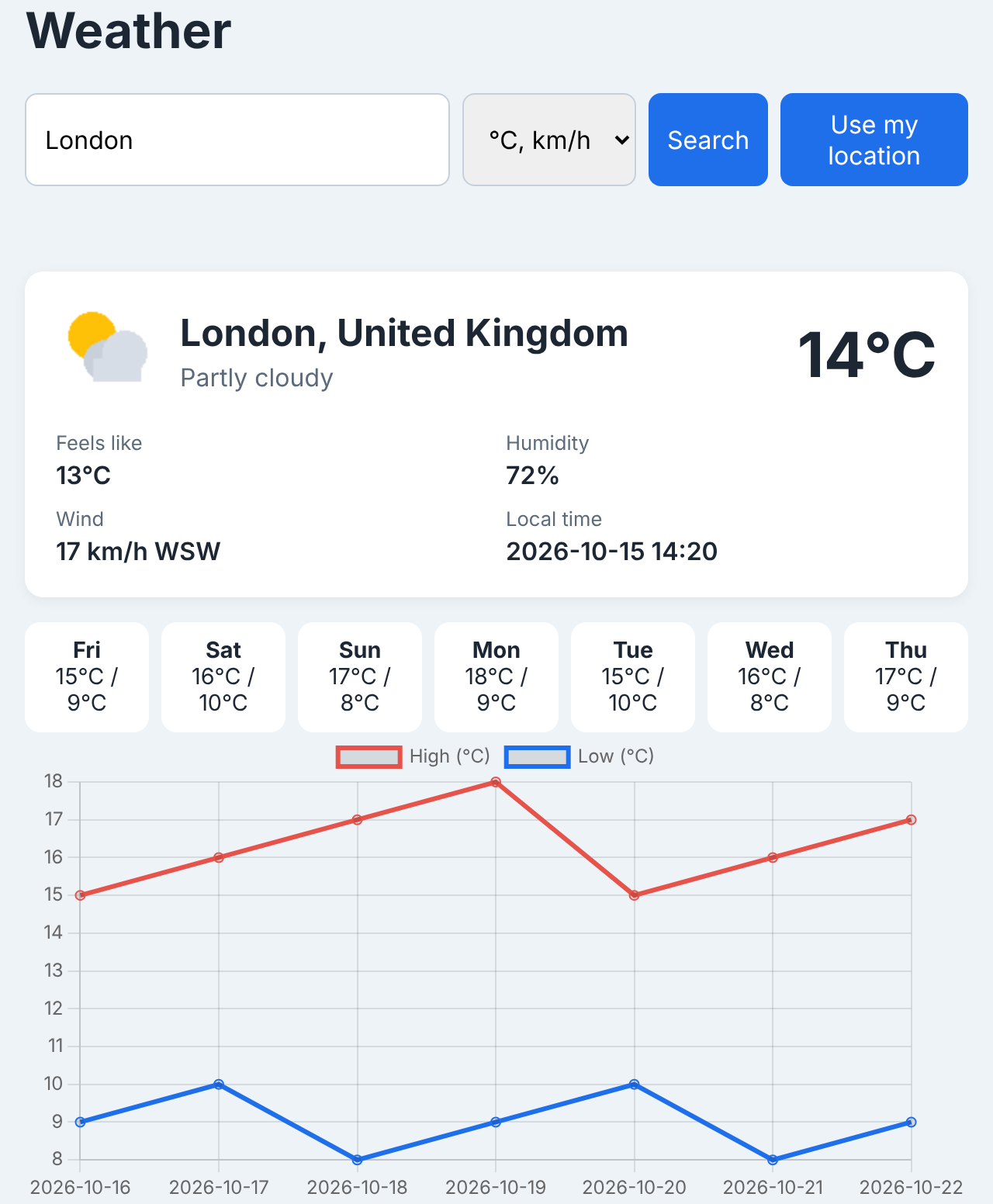
Features:
- City search with current temperature, conditions, feels-like, humidity, wind and local time
- Metric and imperial units
- Loading and error messages
- A Node.js proxy that keeps the API key on the server
- Optional: 7-day forecast, geolocation, map, chart
The file tree is small:
Project structure
weather-app/
├── .env              # your API key (never commit this)
├── server.js         # serves the app and proxies the API
└── public/
    ├── index.html
    ├── style.css
    └── app.js
You need Node.js 20.6 or newer (for the built-in –env-file flag and fetch). No npm packages are required.
Step 1: Get an API key and read the endpoint
Sign up for a free key at weatherstack.com. The free plan includes 100 requests per month, which is plenty for building and demoing this project.
The app uses the current weather endpoint. A request looks like this (the documentation lists every parameter):
Request
GET https://api.weatherstack.com/current?access_key=YOUR_KEY&query=London&units=m
And returns JSON like this:
JSON response
{
  "request": {
    "type": "City",
    "query": "London, United Kingdom",
    "language": "en",
    "unit": "m"
  },
  "location": {
    "name": "London",
    "country": "United Kingdom",
    "region": "City of London, Greater London",
    "lat": "51.517",
    "lon": "-0.106",
    "timezone_id": "Europe/London",
    "localtime": "2026-10-15 14:20",
    "localtime_epoch": 1792074000,
    "utc_offset": "1.0"
  },
  "current": {
    "observation_time": "01:20 PM",
    "temperature": 14,
    "weather_code": 116,
    "weather_icons": [
      "https://cdn.worldweatheronline.com/images/wsymbols01_png_64/wsymbol_0002_sunny_intervals.png"
    ],
    "weather_descriptions": ["Partly cloudy"],
    "wind_speed": 17,
    "wind_degree": 240,
    "wind_dir": "WSW",
    "pressure": 1016,
    "precip": 0,
    "humidity": 72,
    "cloudcover": 50,
    "feelslike": 13,
    "uv_index": 2,
    "visibility": 10,
    "is_day": "yes"
  }
}
The fields this app uses:
| Field | Meaning | Example (units=m) |
|---|---|---|
| location.name, location.country | Resolved place name | London, United Kingdom |
| location.localtime | Local date and time at the location | 2026-10-15 14:20 |
| current.temperature | Air temperature | 14 (°C) |
| current.feelslike | Apparent temperature | 13 (°C) |
| current.weather_descriptions[0] | Text description | Partly cloudy |
| current.weather_icons[0] | Icon URL | PNG image link |
| current.wind_speed, current.wind_dir | Wind speed and compass direction | 17 (km/h), WSW |
| current.humidity | Relative humidity | 72 (%) |
Units are controlled by the units parameter: m for metric (°C, km/h), f for Fahrenheit (°F, mph) and s for scientific (Kelvin, km/h).
Step 2: The interface: HTML and CSS
The page has a search form, a status line for loading and errors, a card for current conditions, and an empty section the forecast fills later. Save this as public/index.html:
public/index.html
<!DOCTYPE html>
<html lang="en">
<head>
  <meta charset="UTF-8">
  <meta name="viewport" content="width=device-width, initial-scale=1.0">
  <title>Weather App</title>
  <link rel="stylesheet" href="style.css">
</head>
<body>
  <main class="app">
    <h1>Weather</h1>
    <form id="search">
      <input id="city" type="text" placeholder="Enter a city, e.g. London" required>
      <select id="units" aria-label="Units">
        <option value="m">°C, km/h</option>
        <option value="f">°F, mph</option>
      </select>
      <button type="submit">Search</button>
    </form>
    <p id="status" class="status" role="status"></p>
    <section id="current" class="card" hidden>
      <div class="headline">
        <img id="icon" alt="">
        <div>
          <h2 id="place"></h2>
          <p id="desc"></p>
        </div>
        <p id="temp" class="temp"></p>
      </div>
      <dl class="details">
        <div><dt>Feels like</dt><dd id="feels"></dd></div>
        <div><dt>Humidity</dt><dd id="humidity"></dd></div>
        <div><dt>Wind</dt><dd id="wind"></dd></div>
        <div><dt>Local time</dt><dd id="localtime"></dd></div>
      </dl>
    </section>
    <section id="forecast" class="forecast"></section>
  </main>
  <script src="app.js"></script>
</body>
</html>
And the styles in public/style.css:
public/style.css
* { box-sizing: border-box; }
body { margin: 0; font-family: system-ui, sans-serif; background: #eef3f8; color: #1d2733; }
.app { max-width: 640px; margin: 40px auto; padding: 0 16px; }
form { display: flex; gap: 8px; margin-bottom: 12px; }
input, select, button { font: inherit; padding: 10px 12px; border: 1px solid #c5d0dc; border-radius: 8px; }
input { flex: 1; }
button { background: #1f6feb; color: #fff; border: none; cursor: pointer; }
.status { min-height: 1.4em; color: #5b6b7c; }
.status.error { color: #c62828; }
.card { background: #fff; border-radius: 12px; padding: 20px; box-shadow: 0 2px 8px rgba(0,0,0,.06); }
.headline { display: flex; align-items: center; gap: 16px; }
.headline h2 { margin: 0; }
.headline p { margin: 4px 0 0; color: #5b6b7c; }
.temp { margin-left: auto !important; font-size: 2.5rem; font-weight: 700; color: #1d2733 !important; }
.details { display: grid; grid-template-columns: repeat(2, 1fr); gap: 12px; margin: 20px 0 0; }
.details dt { font-size: .8rem; color: #5b6b7c; }
.details dd { margin: 2px 0 0; font-weight: 600; }
.forecast { display: grid; grid-template-columns: repeat(auto-fit, minmax(80px, 1fr)); gap: 8px; margin-top: 16px; }
.day { background: #fff; border-radius: 10px; padding: 10px; text-align: center; font-size: .9rem; }
.day strong { display: block; }
Step 3: A small proxy keeps your key off the browser
Any key you put in front-end JavaScript ships to every visitor. It is one click away in the browser’s network tab, and a leaked key can burn through your monthly quota in an afternoon. So the browser never talks to Weatherstack directly. It asks your server, and your server adds the key.
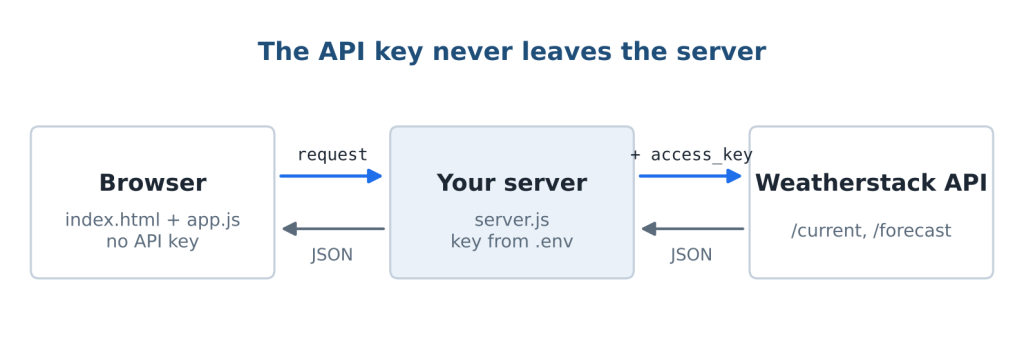
First, the key goes in a .env file in the project root:
.env
WEATHERSTACK_KEY=your_api_key_here
Add .env to your .gitignore before your first commit. Then create server.js:
server.js
// server.js: serves the app and proxies Weatherstack so the key stays on the server.
// Run with: node --env-file=.env server.js   (Node 20.6 or newer)
const http = require("node:http");
const fs = require("node:fs/promises");
const path = require("node:path");

const KEY = process.env.WEATHERSTACK_KEY;
const PUBLIC = path.join(__dirname, "public");
const TYPES = { ".html": "text/html", ".css": "text/css", ".js": "text/javascript" };

async function proxy(endpoint, url, res) {
  const params = new URLSearchParams({
    access_key: KEY,
    query: (url.searchParams.get("q") || "").slice(0, 100),
    units: ["m", "f", "s"].includes(url.searchParams.get("units")) ? url.searchParams.get("units") : "m",
  });
  if (endpoint === "forecast") params.set("forecast_days", "7");
  try {
    const upstream = await fetch(`https://api.weatherstack.com/${endpoint}?${params}`);
    res.writeHead(200, { "Content-Type": "application/json" });
    res.end(await upstream.text());
  } catch {
    res.writeHead(502, { "Content-Type": "application/json" });
    res.end(JSON.stringify({ error: { code: 502, info: "Weather service unreachable." } }));
  }
}

http.createServer(async (req, res) => {
  const url = new URL(req.url, "http://localhost");
  if (url.pathname === "/api/current") return proxy("current", url, res);
  if (url.pathname === "/api/forecast") return proxy("forecast", url, res);

  const file = path.join(PUBLIC, path.normalize(url.pathname === "/" ? "/index.html" : url.pathname));
  if (!file.startsWith(PUBLIC)) { res.writeHead(403); return res.end(); }
  try {
    const body = await fs.readFile(file);
    res.writeHead(200, { "Content-Type": TYPES[path.extname(file)] || "application/octet-stream" });
    res.end(body);
  } catch {
    res.writeHead(404); res.end("Not found");
  }
}).listen(3000, () => console.log("Weather app on http://localhost:3000"));
What it does:
- /api/current?q=London&units=m and /api/forecast forward to Weatherstack with the key added on the server.
- It only passes through the parameters you allow (q capped at 100 characters, units limited to m, f or s), so nobody can use your proxy to call other endpoints with your key.
- Everything else is served from public/, with a check that stops requests from escaping that folder.
- Because the page and the API share an origin, there are no CORS issues.
Start it with node –env-file=.env server.js and open http://localhost:3000.
Step 4: Fetch and render
Now the front end. app.js calls the proxy, checks for errors, and fills in the card. Save this as public/app.js:
public/app.js
const form = document.getElementById("search");
const statusEl = document.getElementById("status");
const currentEl = document.getElementById("current");
const forecastEl = document.getElementById("forecast");
const $ = (id) => document.getElementById(id);

const UNIT_LABELS = {
  m: { temp: "°C", wind: "km/h" },
  f: { temp: "°F", wind: "mph" },
};

function setStatus(message, isError = false) {
  statusEl.textContent = message;
  statusEl.classList.toggle("error", isError);
}

async function getJSON(path) {
  const res = await fetch(path);
  const data = await res.json();
  // Weatherstack reports problems inside the JSON body, so check data.error, not just res.ok
  if (!res.ok || data.error) throw new Error(data.error?.info || `Request failed (${res.status})`);
  return data;
}

function renderCurrent(data, units) {
  const { location, current } = data;
  const u = UNIT_LABELS[units];
  $("place").textContent = `${location.name}, ${location.country}`;
  $("desc").textContent = current.weather_descriptions[0];
  $("icon").src = current.weather_icons[0];
  $("icon").alt = current.weather_descriptions[0];
  $("temp").textContent = `${current.temperature}${u.temp}`;
  $("feels").textContent = `${current.feelslike}${u.temp}`;
  $("humidity").textContent = `${current.humidity}%`;
  $("wind").textContent = `${current.wind_speed} ${u.wind} ${current.wind_dir}`;
  $("localtime").textContent = location.localtime;
  currentEl.hidden = false;
}

async function loadWeather(query, units) {
  setStatus("Loading…");
  currentEl.hidden = true;
  forecastEl.innerHTML = "";
  try {
    const q = encodeURIComponent(query);
    const data = await getJSON(`/api/current?q=${q}&units=${units}`);
    renderCurrent(data, units);
    setStatus("");
  } catch (err) {
    setStatus(err.message, true);
  }
}

form.addEventListener("submit", (event) => {
  event.preventDefault();
  loadWeather($("city").value.trim(), $("units").value);
});
Three details worth noticing:
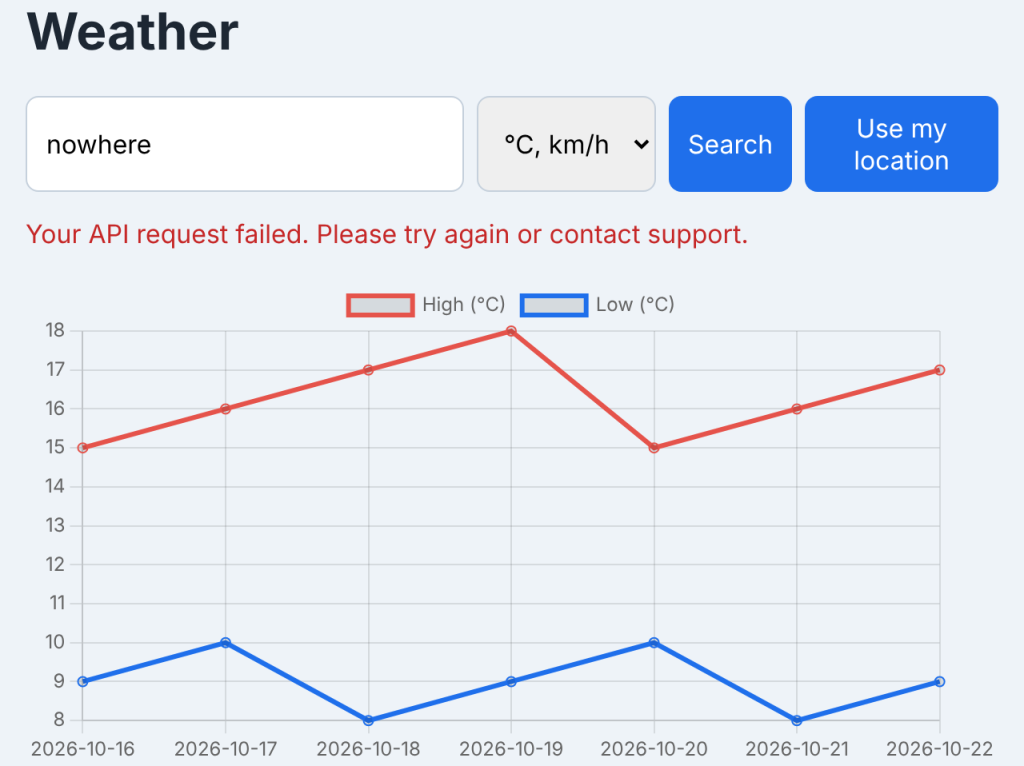
- getJSON throws on both HTTP errors and API errors. Weatherstack puts error details in the JSON body (data.error.code and data.error.info), so checking res.ok alone would miss them.
- Every value is written with textContent, so a strange location name can never inject HTML into your page.
- The unit labels come from the same units value sent to the API, so the page always says km/h when the data is in km/h.
Search for a city and you have a working weather app. Search for a place that does not exist and the error state appears instead of a blank card:
Add a 7-day forecast
The forecast endpoint takes the same query plus forecast_days. It is included from the Professional plan upward (7 days; Business and Enterprise go to 14), per the Weatherstack pricing page. On the free plan the request returns an error, and the code below shows a friendly message instead of breaking the app. For more on building with forecast data, see our weather forecast API guide.
The proxy already supports /api/forecast. Add this function to the bottom of app.js:
public/app.js (add)
// Add below the code in app.js. Requires a plan that includes the forecast endpoint.
async function loadForecast(q, units) {
  try {
    const data = await getJSON(`/api/forecast?q=${q}&units=${units}`);
    const u = UNIT_LABELS[units];
    forecastEl.innerHTML = Object.values(data.forecast)
      .map((day) => {
        const label = new Date(day.date + "T12:00").toLocaleDateString(undefined, { weekday: "short" });
        return `<div class="day"><strong>${label}</strong>${day.maxtemp}${u.temp} / ${day.mintemp}${u.temp}</div>`;
      })
      .join("");
  } catch (err) {
    forecastEl.innerHTML = `<p class="status">Forecast unavailable: ${err.message}</p>`;
  }
}
Then call it in loadWeather, right after setStatus(“”):
public/app.js (inside loadWeather)
    renderCurrent(data, units);
    setStatus("");
    loadForecast(q, units);
The forecast object is keyed by date, with daily summary fields:
JSON response (forecast, trimmed)
{
  "location": { "name": "London", "country": "United Kingdom" },
  "current": { "temperature": 14 },
  "forecast": {
    "2026-10-16": {
      "date": "2026-10-16",
      "mintemp": 9,
      "maxtemp": 15,
      "avgtemp": 12,
      "totalsnow": 0,
      "sunhour": 6.2,
      "uv_index": 2
    },
    "2026-10-17": {
      "date": "2026-10-17",
      "mintemp": 10,
      "maxtemp": 16,
      "avgtemp": 13,
      "totalsnow": 0,
      "sunhour": 4.8,
      "uv_index": 2
    }
  }
}
Stretch goals: geolocation, a Leaflet map, a Chart.js temperature chart
Each of these is independent. Add the ones you want.
Use my location
Weatherstack accepts coordinates as the query (51.517,-0.106), so geolocation only needs a button and a few lines. Add <button type=”button” id=”locate”>Use my location</button> inside the form, then:
public/app.js (add)
document.getElementById("locate").addEventListener("click", () => {
  navigator.geolocation.getCurrentPosition(
    (pos) => {
      const query = `${pos.coords.latitude.toFixed(3)},${pos.coords.longitude.toFixed(3)}`;
      loadWeather(query, $("units").value);
    },
    () => setStatus("Location access was denied. Search by city instead.", true)
  );
});
Browsers only allow geolocation on HTTPS pages or localhost.
A Leaflet map
Add Leaflet’s CSS and script to the <head>, and a map container after the forecast section:
public/index.html (add)
<link rel="stylesheet" href="https://unpkg.com/[email protected]/dist/leaflet.css">
<script src="https://unpkg.com/[email protected]/dist/leaflet.js"></script>

<div id="map" style="height: 260px; margin-top: 16px"></div>
public/app.js (add)
let map, marker;
function showMap(location) {
const coords = [Number(location.lat), Number(location.lon)];
if (!map) {
map = L.map("map").setView(coords, 10);
L.tileLayer("https://tile.openstreetmap.org/{z}/{x}/{y}.png", {
maxZoom: 19,
attribution: "© OpenStreetMap contributors",
}).addTo(map);
marker = L.marker(coords).addTo(map);
} else {
map.setView(coords, 10);
marker.setLatLng(coords);
}
}Call showMap(data.location) in loadWeather after renderCurrent. The API returns lat and lon as strings, which is why the function converts them with Number().
A Chart.js temperature chart
This one needs the forecast data. Add the script and a canvas:
public/index.html (add)
<script src="https://cdn.jsdelivr.net/npm/[email protected]/dist/chart.umd.js"></script>

<canvas id="chart"></canvas>
public/app.js (add)
let chart;
function showChart(forecast, tempUnit) {
const days = Object.values(forecast);
if (chart) chart.destroy();
chart = new Chart(document.getElementById("chart"), {
type: "line",
data: {
labels: days.map((d) => d.date),
datasets: [
{ label: `High (${tempUnit})`, data: days.map((d) => d.maxtemp), borderColor: "#e5534b" },
{ label: `Low (${tempUnit})`, data: days.map((d) => d.mintemp), borderColor: "#1f6feb" },
],
},
options: { responsive: true },
});
}Call showChart(data.forecast, u.temp) in loadForecast, right after the forecast cards render. Destroying the old chart before drawing a new one stops charts from stacking up when you search again.
Common errors and fixes
| Symptom | Likely cause | Fix |
|---|---|---|
| Error 101 (missing or invalid access key) | Key missing from .env, or the server was started without –env-file | Check .env, restart with node –env-file=.env server.js |
| Error 104 (usage limit reached) | Monthly request quota used up | Wait for the reset or upgrade; cache results during development |
| Error 105 (function access restricted) | Calling a feature your plan does not include, such as the forecast on the free plan | Hide the feature or upgrade the plan |
| Error 615 (request failed) | The location could not be resolved | Check the spelling, or add the country: “Paris, France” |
| CORS error in the console | The browser is calling the API directly instead of your proxy | Fetch /api/current, not the Weatherstack URL |
| Wind looks wrong | Unit mismatch between request and label | Use km/h for m and s, mph for f |
| Blank page, fetch is not defined on the server | Node.js older than 18 | Upgrade to Node.js 20.6+ |
The full error code list is in the Weatherstack documentation.
FAQs
How do I make a weather app in JavaScript?
Get a weather API key, build a simple HTML form, and use fetch to request current weather for the city the user enters. Render the JSON fields (temperature, description, wind, humidity) into the page. For anything public, route the request through a small server proxy so the key stays private.
Which weather API is free for students?
Weatherstack’s free plan includes 100 requests per month of current weather data, which covers building and demoing a student project. Forecast and historical data require a paid plan.
How do I hide my API key in a JavaScript app?
Keep the key on a server. Store it in an environment variable, have a small Node.js proxy add it to requests, and make the browser call your proxy instead of the weather API directly.
Can I chart forecast data with Chart.js?
Yes. Map the forecast object’s dates to chart labels and its maxtemp and mintemp values to two datasets, then draw a line chart. Destroy the previous chart before drawing a new one.
| Build it with live data. Get a free Weatherstack API key with 100 requests per month and have this app running in under an hour. |